
Private AI for iPhone, iPad & Mac Your Model. Your Device. Your Data.
Privacy AI runs language models directly on your iPhone, iPad and Mac. Run 100+ models offline, connect your own server, or use any of 15+ cloud providers.
no account. no data collection.
Built for developers, researchers, lawyers and analysts who can't paste their work into someone else's chatbot.
That's how private AI should work.
skills
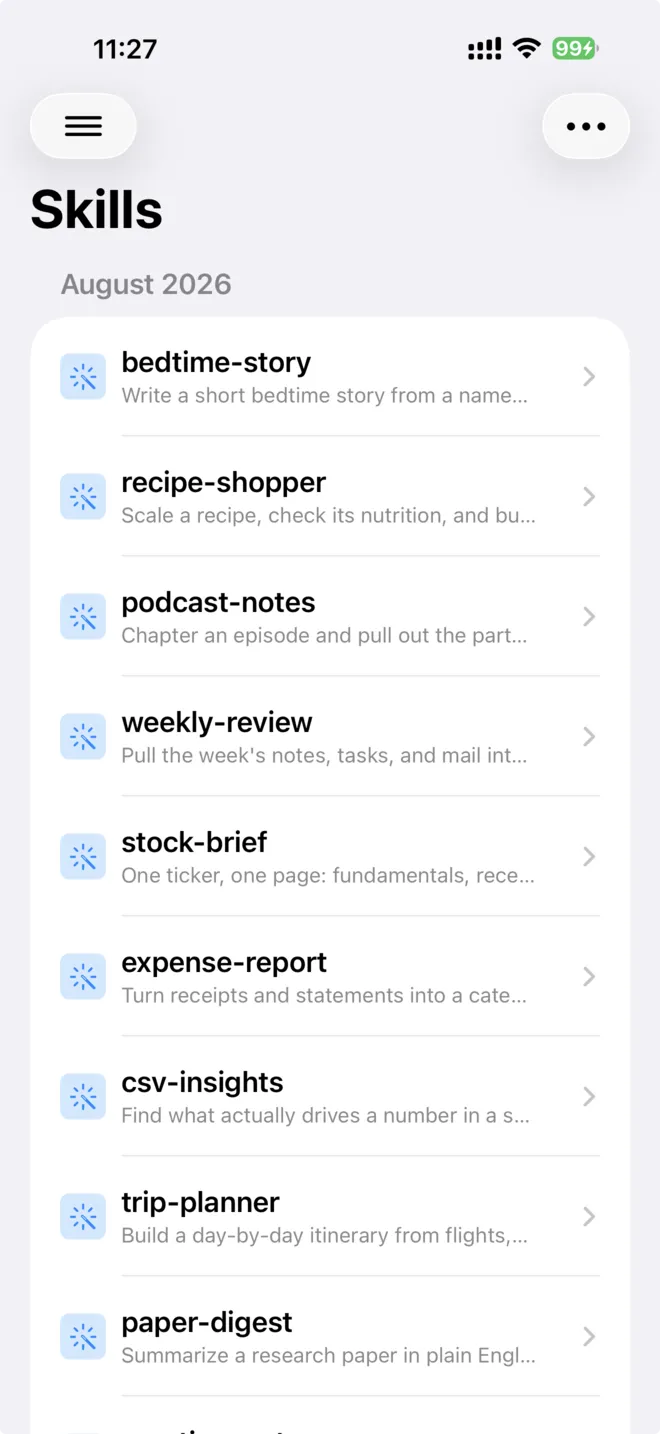
A skill is a folder of written instructions, plus any scripts and data it needs, that teaches the AI how you want a particular job done. Your skills live in one library, and each becomes a tool the AI can call by name, so a library of thirty skills costs nothing until one is actually used.
- p.01teach the AI how you work
- p.02each skill becomes a callable tool
- p.03import from a repository, zip, or folder
- p.04works in chats, mini apps, and agents
agent
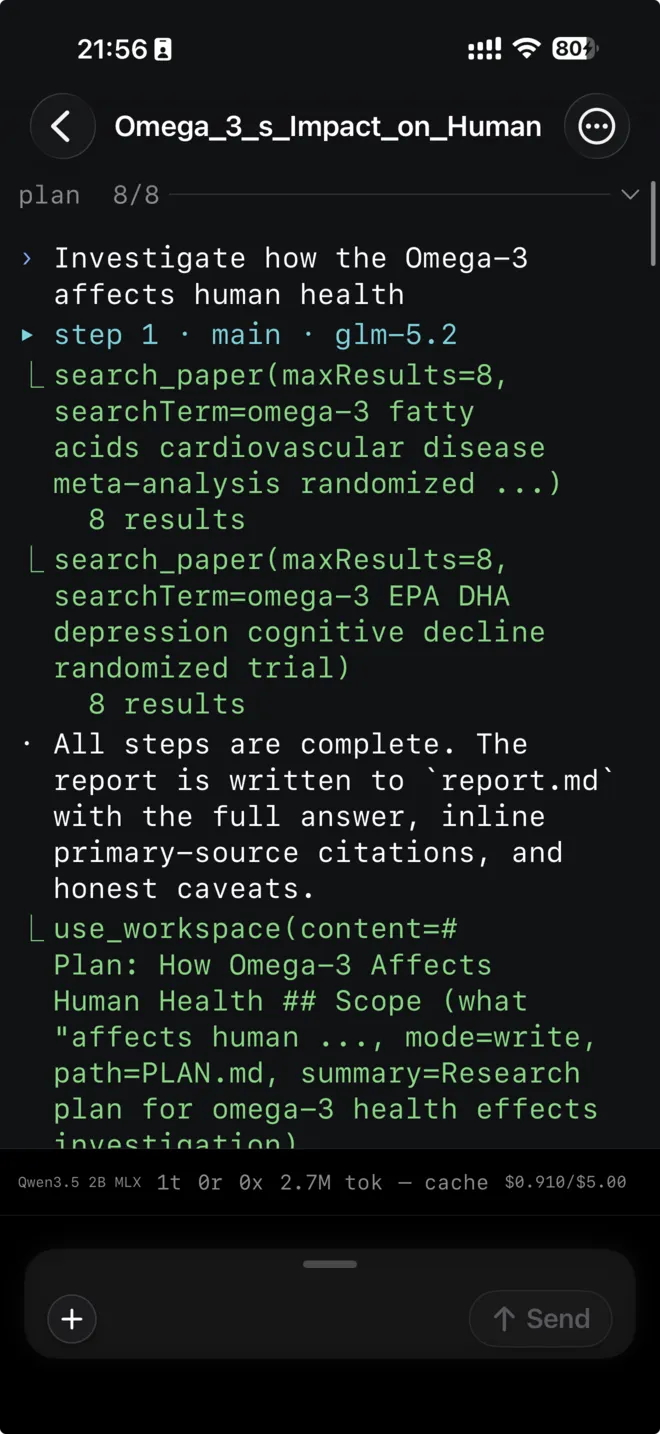
Give the Agent a goal and it works toward it over many turns instead of answering once and stopping. It writes a plan, calls whatever tools the job needs, keeps its own folder of files as it goes, and delivers a written report you can read, share, and reopen later.
- p.01works toward one goal over many turns
- p.02plans, calls tools, keeps its own files
- p.03delivers a written report
- p.04watch every step as it runs
gguf models
Run any GGUF-format language model entirely on your device, with no internet connection required. Privacy AI uses the llama.cpp engine to run models ranging from lightweight 1B-parameter models on older devices to large 70B+ models on high-memory devices.
- p.01fully offline on-device inference
- p.02supports 1B to 70B+ models
- p.03text and vision models included
- p.0450+ tools available locally
live transcription
Transcribe speech to text in real time using on-device MLX speech recognition and voice activity detection models. Supports 12 languages: English, Chinese, Japanese, Korean, French, German, Spanish, Italian, Portuguese, Russian, Arabic, and Swedish.
- p.01real-time on-device transcription
- p.0212 languages supported
- p.03simultaneous translation
- p.04fully private, no cloud upload
every part.
all 224 features, grouped by area. open a group to browse it.
c.01 Local Models 23 parts
GGUF models supported by llama.cpp enginev1.8.4
Run any GGUF-format language model entirely on your device, with no internet connection required. Privacy AI uses the llama.cpp engine to run models ranging from lightweight 1B-parameter models on older devices to large 70B+ models on high-memory devices. Both text and vision models are supported, so you can chat, analyze images, and use all 50+ tools completely privately.
- fully offline on-device inference
- supports 1B to 70B+ models
- text and vision models included
- 50+ tools available locally
MLX models supported by MLX swift enginev1.8.4
Run MLX-format models optimized for Apple Silicon chips. The MLX engine is purpose-built for the unified memory architecture of M-series chips, making it significantly faster for generation on compatible Mac and iPad hardware. Download any MLX model from HuggingFace and use it with all of Privacy AI's tools and features. The same engine also runs on-device speech models for text to speech, speech to text, and voice activity detection.
- Apple Silicon optimized
- faster generation on M-series chips
- download from HuggingFace
- also runs on-device speech models
Apple's on-device Foundation Modelv1.8.4
Use Apple Intelligence, Apple's built-in on-device model available on iOS 26+ and macOS 26+. No API key or download required; the model runs entirely on-device using Apple's secure on-device framework. Select "Apple Intelligence" as your model to use it in any chat, with all tools and features available.
- no download or API key needed
- iOS 26+ and macOS 26+ support
- fully on-device and private
- all tools and features available
GGUF Vision Modelsv1.8.4
Analyze images and photos using local vision models such as Qwen-VL and PaddleOCR-VL. Drop an image into your chat and the model will describe it, extract text from it, answer questions about it, or use it as context for further reasoning. All image understanding happens on your device, with no images ever sent to a server.
- on-device image analysis
- text extraction from images
- supports Qwen-VL and PaddleOCR-VL
- fully private, no server upload
MLX Vision Modelsv1.8.4
Run vision-capable MLX models for image understanding on Apple Silicon devices. These models leverage the fast MLX engine for efficient image plus text reasoning, letting you attach photos to your messages and get intelligent analysis entirely offline.
- Apple Silicon image reasoning
- attach photos to messages
- fast MLX engine
- fully offline
MLX Audio Modelsv1.8.4
Run Qwen3 TTS (text-to-speech), Qwen3 ASR (speech-to-text), and VAD (voice activity detection) models using the MLX audio engine. All audio processing happens on your device. Use these models for real-time transcription, translation, and natural-voice TTS output with no cloud dependency.
- on-device TTS, ASR, and VAD
- real-time transcription and translation
- natural-voice output
- no cloud dependency
Whisper Models for Transcriptionv1.8.4
Transcribe spoken audio to text using Whisper models powered by WhisperKit. Download a Whisper model once and use it to transcribe voice notes, recorded meetings, or any audio file, completely offline. Multiple model sizes are available to balance speed and accuracy.
- offline speech-to-text
- multiple model sizes
- transcribe voice notes and recordings
- WhisperKit powered
Local Model Tool Callingv1.8.4
Local models can call any of the 50+ built-in tools, from web search and calendar management to image generation and shell commands. When you ask a local model to look something up or perform an action, it will use the appropriate tool automatically, then return the result as part of its response, all without leaving your device.
- 50+ tools available to local models
- automatic tool selection
- calendar, search, shell commands and more
- fully on-device execution
Local Model Templatev1.8.4
Create a reusable template for a local model with a customized parameter set and tool selection. Every chat created from that template inherits the same settings without needing to reconfigure them. Configurable parameters include: context window size, seed, temperature, mirostat mode, Direct I/O, BOS/EOS tokens, batch size, top_k, top_p, min_p, repeat penalty, repeat last N, max tokens, tool result limit, image support, and more.
- reusable parameter presets
- one-tap chat creation from template
- extensive parameter control
- tool selection saved per template
Download Models from HuggingFacev1.8.4
Browse and download GGUF and MLX models directly from HuggingFace inside the app. Downloads resume automatically if interrupted and show real-time progress. Large models with separate vision projection files (mmproj) download both files together and link them automatically.
- in-app HuggingFace browser
- resumable downloads with progress
- GGUF and MLX support
- automatic mmproj linking
iCloud Model Syncv1.8.4
Download a model once and it becomes available on all your devices via iCloud Drive. Switch between iPhone, iPad, and Mac without re-downloading large model files. Model settings and configurations also sync across devices.
- download once, use everywhere
- iCloud Drive sync
- no re-downloading on new devices
- settings sync included
Import GGUF from Filesv1.8.4
Import a GGUF model file you already have by picking it from the Files app. Privacy AI copies it to its model storage and makes it immediately available for chat. Useful for models obtained outside HuggingFace or for offline device setups.
- import from Files app
- no internet required
- immediate availability
- supports offline device setups
Separate Vision Projection Filev1.8.4
For vision models that require a separate projection file (mmproj), Privacy AI handles downloading and linking the file automatically. You can also import a local mmproj file manually if you have it on your device.
- automatic mmproj download and linking
- manual import option
- enables local vision models
- seamless setup
Core AI Neural Engine Modelsv3.2.0
Run models on your device's Neural Engine, a fourth on-device engine alongside llama.cpp, MLX and Apple Intelligence. It is the only one that keeps writing after you leave the app, so a long answer carries on while you do something else, and it works inside the AI Keyboard too. Each model is built for your particular chip before first use and the result is kept, so you wait only once. Download one from a HuggingFace repository or import it from a zip file, on iOS 27 or macOS 27.
- runs on the Neural Engine
- keeps generating in the background
- works in the AI Keyboard
- iOS 27 and macOS 27
Live Transcription and Real-time Translationv1.8.4
Transcribe speech to text in real time using on-device MLX speech recognition and voice activity detection models. Supports 12 languages: English, Chinese, Japanese, Korean, French, German, Spanish, Italian, Portuguese, Russian, Arabic, and Swedish. Transcription is paired with real-time translation so you can see speech from one language translated to another instantly. Everything runs on your device with no audio ever sent to the cloud.
- real-time on-device transcription
- 12 languages supported
- simultaneous translation
- fully private, no cloud upload
File Transcriptionv1.8.4
Upload any audio or video file from the Files app or photo library and transcribe it to text on your device. Export the transcription as an SRT subtitle file, a VTT file, or plain text. Useful for transcribing meetings, lectures, podcasts, or voice memos.
- transcribe any audio or video file
- SRT, VTT, and plain text export
- fully offline
- meetings, lectures, and podcasts
Offline TTS with Kokorov1.8.4
Convert any text to natural-sounding speech using the Kokoro-82M voice model, powered by sherpa-onnx and running entirely on your device. Choose from 53 voice styles across multiple accents and genders. Export generated audio as M4A, WAV, or AIFF files to use in other apps.
- 53 voice styles offline
- M4A, WAV, AIFF export
- fully on-device, no cloud
- natural-sounding Kokoro-82M model
MLX Audio Modelsv1.8.4
Run Qwen3-based TTS, ASR, and VAD models using the MLX audio engine for Apple Silicon devices. These models offer high-quality speech synthesis and recognition while leveraging Apple Silicon's performance for fast, low-latency processing.
- Apple Silicon audio models
- Qwen3 TTS, ASR, and VAD
- fast low-latency processing
- high-quality synthesis
Read Aloudv1.8.4
Tap the speaker icon on any AI reply to have it read aloud with your chosen TTS engine. Supports Apple's built-in voice, the local Kokoro engine, and MLX audio models. Adjust speed and voice in settings.
- Apple, Kokoro, and MLX TTS engines
- adjustable speed and voice
- one-tap read aloud
Voice Recognitionv1.8.4
Tap the microphone icon in the chat input field to dictate your message using the device's built-in speech recognition. Dictated text appears directly in the input field for editing before sending.
- tap-to-dictate input
- built-in speech recognition
- edit before sending
Cloud TTSv1.8.4
Use OpenAI-compatible TTS endpoints (such as gpt-4o-tts) as a cloud voice provider alongside the local TTS engines. Configure a cloud TTS provider in settings to use it for Read Aloud on any chat.
- cloud TTS endpoint support
- gpt-4o-tts compatible
- works alongside local engines
- configured in settings
Siri Integrationv1.8.4
Trigger Privacy AI through Siri using natural language. Say "Ask Privacy AI to..." to open a new chat with your query. Configure which tools are enabled for Siri-triggered sessions in settings.
- Siri voice trigger
- opens new chat with query
- per-tool configuration for Siri
Voice Clonev3.2.3
Create your own voice from a short recording, an imported audio or video clip, or a written description. Each sample is cleaned up and transcribed on your device, and the app checks it is long and loud enough before you save it. Pick the voice to have chats read aloud and Text to Audio files made in it, and export it as a .voicebox.zip to use on another device.
- record, import or describe a voice
- on-device cleanup and checks
- reads chats and Text to Audio
- export and import voices
c.02 Advanced AI 33 parts
Agentv3.0.0
Give the Agent a goal and it works toward it over many turns instead of answering once and stopping. It writes a plan, calls whatever tools the job needs, keeps its own folder of files as it goes, and delivers a written report you can read, share, and reopen later. It suits work that has to be broken down before it can be done, such as deep research on an unfamiliar topic, planning a trip with several legs, or comparing options against each other. You can watch each step as it happens, and the finished report lists the sources it actually cited separately from the ones it only opened.
- works toward one goal over many turns
- plans, calls tools, keeps its own files
- delivers a written report
- watch every step as it runs
Agent Presetsv3.0.0
Save a reusable setup for the Agent: which model it runs on, which playbook it follows, which tools it may call, and which skills it can use. Presets let you keep a research agent, a coding agent, and a writing agent side by side without reconfiguring anything between runs.
- reusable agent configurations
- model, playbook, tools, and skills
- keep several agents side by side
Agent Run Historyv3.0.0
Every Agent run is kept with its plan, its files, and its final report, so you can reopen a run days later to see what was done and why. Reports can be shared out of the app in full.
- every run kept with its files
- reopen past runs anytime
- share the full report
LLM Councilv1.8.4
Ask a question once and get answers from multiple AI models simultaneously. Privacy AI sends your query to a council of models you choose, collecting their independent responses side by side. Use the council to explore different perspectives, stress-test ideas, compare model quality, or simply get richer answers than any single model can provide.
- query multiple models at once
- compare answers side by side
- explore diverse perspectives
- flagship multi-model feature
LLM Council Templatesv1.8.4
Seven ready-made council configurations let you start a multi-model discussion with one tap. Available templates: Debate (structured pros/cons for decision making), Research (deep analysis across multiple perspectives), Balanced (mixed models for general-purpose discussions), Business Strategy (strategic planning and market analysis), Critical Thinker (challenge assumptions and stress-test ideas), Game Theory: Classic Games (explore strategic scenarios from classic game theory), and Game Theory: Custom Scenario (describe your own strategic situation for the council to play out).
- 7 ready-made configurations
- one-tap multi-model start
- covers debate, research, business, game theory
Council Discussion Modesv1.8.4
Two discussion modes control how council members respond to your query. Standard mode sends the same query to all members simultaneously and they each respond independently. Role Assignment mode has the chairman first analyze your query, then assign each member a unique perspective or analytical role so the group produces maximally diverse and complementary insights.
- Standard mode for parallel independent responses
- Role Assignment mode for diverse perspectives
- chairman-guided role distribution
Game Theory Modev1.8.4
Council members play through strategic negotiation scenarios across multiple rounds, inspired by the research paper "Can Large Language Models be Good Game Theorists?" (arXiv:2411.05990). In Classic Games mode, models compete or cooperate in well-known game theory scenarios. In Custom Scenario mode, you describe any strategic situation and the council acts it out, revealing how different decision-making strategies unfold over time.
- multi-round strategic scenarios
- Classic Games and Custom Scenario modes
- research-inspired design
- reveals decision-making strategies
Automatic Model Routingv1.8.4
Smart Chat picks the best AI model for every message automatically, so you never have to choose one by hand. Set up your model tiers once, then just type, and each message is scored for complexity, privacy, and content type and sent to the right model. A small badge on every reply shows which model answered and why, and you can override the choice for any single message.
- best model picked per message
- no manual model switching
- routing badge on every reply
- override any time
Tiered Model Setupsv1.8.4
Create reusable setups that map model tiers to your own choices: a fast model for simple questions, a capable model for complex work, a reasoning model for hard problems, and a local model for anything private. Each setup can use different models, tools, and memory settings, and Smart Chat falls back to a backup model automatically if one is unavailable. You can keep several setups for different kinds of work and switch between them per chat.
- simple, complex, reasoning, privacy tiers
- reusable per-chat setups
- automatic fallback model
- per-setup tools and memory
Privacy-Aware Routingv1.8.4
Messages that contain personal or sensitive information are detected and kept on a local on-device model instead of being sent to the cloud. Smart Chat recognizes things like ID numbers, credit cards, phone numbers, and names across many languages, so private details stay on your device. This happens automatically with no setup beyond choosing your preferred local model.
- sensitive messages stay on device
- detects IDs, cards, phones, names
- works across many languages
- automatic, no extra setup
Cost Budgets and Statisticsv1.8.4
Set daily and monthly spending budgets for each setup and get a notification when you approach the limit. A cost statistics view breaks down spending by model tier and estimates how much you saved versus routing everything to your most expensive model. You can optionally have Smart Chat shift to the cheapest tier while over budget so chats keep working at lower cost.
- daily and monthly budgets
- spending by model tier
- savings estimate
- optional budget downgrade
Memory Systemv1.8.4
Privacy AI remembers what matters to you across every conversation. Facts you share, preferences you state, and details worth keeping are saved to a personal memory store, organized into sectors such as life, work, and study, and recalled by meaning rather than by keyword when they are relevant to what you are asking. You stay in control: browse, edit, or delete any memory at any time, import memories from a past conversation, and chat with your memory directly. Everything is stored on your device and syncs only through your own iCloud account.
- remembers across conversations
- organized into life, work, study
- recalled by meaning not keywords
- stored on device, your iCloud only
Memory Managementv1.8.4
Privacy AI maintains a personal memory store that the AI can recall during conversations. Add, edit, and delete individual memories at any time from the Memory settings screen. Memories are stored privately on your device and synced via iCloud.
- personal memory store
- add, edit, delete memories
- iCloud synced and private
Memory Sectorsv1.8.4
Memories are organized into sectors such as life, work, and study, making it easy to browse and manage your stored information by category. Create memories in the relevant sector so the AI retrieves the most context-appropriate information.
- organized by life, work, study sectors
- easy category browsing
- context-appropriate recall
Chat with Memoryv1.8.4
When memory is enabled for a chat, Privacy AI automatically searches your memory store and injects the most relevant memories as context before every AI response. The AI uses your personal background, preferences, and prior knowledge to give more relevant, personalized answers.
- automatic memory injection
- personalized AI responses
- most relevant memories per query
Import Memory from Conversationv1.8.4
After a conversation, tap the import button to extract key facts and preferences from the chat and save them to your memory store with one tap. Privacy AI uses AI to identify what is worth remembering and formats it automatically.
- AI-powered fact extraction
- one-tap memory import
- automatic formatting
Semantic Memory Searchv1.8.4
Search your stored memories using natural language rather than exact keywords. Type what you are looking for and Privacy AI finds the most semantically similar memories, even if they use different words.
- natural language memory search
- semantic similarity matching
- finds memories with different words
Knowledge Wikiv2.2.0
Turn your own documents into a personal, cross-linked knowledge base that Privacy AI builds and maintains for you. Add your files and the app reads each one, writes clean summary pages, and links the related people, topics, and ideas together automatically. Everything is kept on your device as plain Markdown you can also open in Obsidian, and you can create as many separate knowledge bases as you like, one for each project or subject. Then explore it as an interactive graph, ask it questions, and get answers cited straight back to your sources.
- AI builds a linked wiki from your files
- one knowledge base per project
- on-device Markdown, Obsidian compatible
- graph, search, and cited answers
Add Sources From Anywherev2.2.0
Build a knowledge base from almost anything: PDF, Word, and EPUB documents, web pages, Markdown, text, and CSV files, plus photos, videos, and links you paste. Import from Files, Photos, the camera, or a web address, and the AI reads the whole document, not just the first few pages, so nothing important is missed. Add several sources at once and watch each one's progress as it is processed.
- PDF, Word, EPUB, web, and more
- import from Files, Photos, or camera
- reads the whole document
- batch import with live progress
Ask Your Knowledge Basev2.2.0
Ask a question in plain language and get a clear answer drawn from your own sources, with every point linked back to the exact wiki pages it came from so you can check the details. Choose Quick for a fast, direct reply, or Thorough when you want the AI to weigh more of your material. Save any good answer back into your knowledge base to keep it for later.
- plain-language questions
- answers cited to your pages
- Quick or Thorough modes
- save answers back into the wiki
Interactive Knowledge Graphv2.2.0
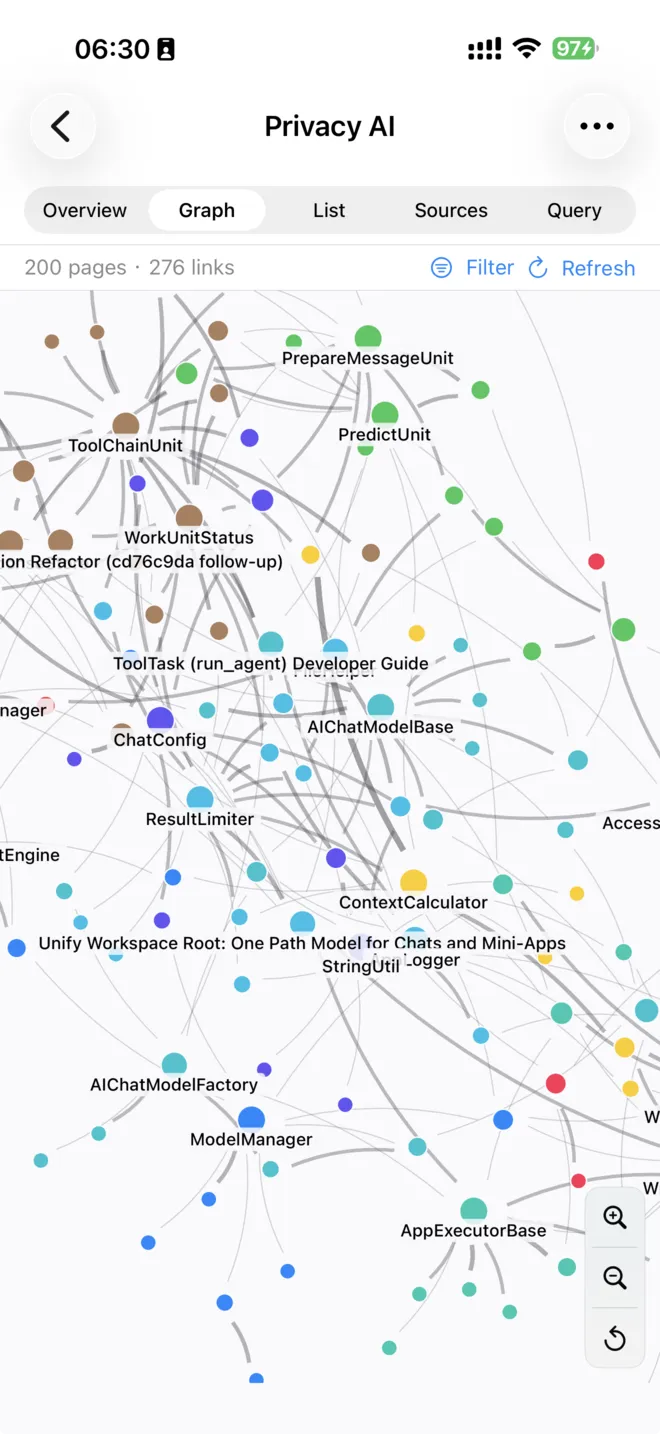
See how everything in your knowledge base connects in a live, interactive map. Related pages gather into color-coded topic clusters, stronger connections stand out, and you can pinch to zoom, drag things around, and tap any point to open its page. Zoom in to reveal more labels and explore the finer detail.
- visual map of your knowledge
- color-coded topic clusters
- pinch, drag, and tap to open pages
- zoom in for more detail
Automatic Overview and Insightsv2.2.0
Each knowledge base keeps a living Overview page that the AI rewrites as you add material, so you get an up-to-date summary the moment you open it. Tap Graph Insights for an AI-written tour of the biggest themes and how your topics relate, with links straight to the relevant pages.
- living overview, always current
- AI tour of the main themes
- links straight to the pages
Wikis In Your Languagev2.2.0
Create a knowledge base in the language you want. Pick a language when you create it and the AI writes every page and answers every question in that language, across all supported app languages, while keeping your links and page names intact.
- choose the language per knowledge base
- pages and answers in your language
- links and page names stay intact
Git Sync For Your Wikiv2.2.0
Back up and sync any knowledge base with GitHub or another Git service. Publish a knowledge base to a private or public repository, pull updates on another device, or clone an existing repository straight into a new knowledge base. You can browse the full history of changes, compare versions line by line, and restore any earlier version, all from inside the app.
- sync with GitHub or any Git remote
- publish, pull, and clone repositories
- history, line diffs, and restore
Wiki Health Checkv2.2.0
Keep your knowledge base tidy with a one-tap Health Check. It finds pages that link nowhere, broken links, and missing pages so you can spot gaps at a glance. An optional deeper review uses AI to flag possible contradictions and unverified claims.
- one-tap structural check
- finds orphan and broken links
- optional AI contradiction review
Email Assistantv2.2.1
A private AI that triages your inbox for you. Connect any IMAP mail account, tap Process Inbox, and the assistant reads your unread mail, tells you what matters, flags the messages that need a reply, and files the rest into tidy folders it manages under an AI label. You choose how far it goes: summarize only, organize into folders, or also move obvious junk aside. Passwords stay in your device Keychain, message content is never stored, and nothing in your mailbox is ever deleted.
- AI reads and sorts your inbox
- summarize, organize, or clear junk
- credentials stay in your Keychain
- nothing is ever deleted
Process Your Inbox Your Wayv2.2.1
Pick how much the assistant does per account: just summarize what arrived, organize everything into folders, or also move clear junk to your junk folder. It works only on unread mail and marks each message read as it goes, so a run you stop and start again simply picks up where it left off. Senders you have written to before are never treated as junk.
- summarize, organize, or junk modes
- processes only unread mail
- safe to stop and resume
- people you know are never junked
Every Run Explained, Every Action Undoablev2.2.1
Each run produces a clear, dated report grouped by month and day. Every decision shows what the assistant did and why, and any move, filing, or action can be undone with a single tap. Open any message to read its cleaned-up content right in the report, and mark threads to teach the assistant what you care about.
- dated report for every run
- one-tap undo on any action
- read message content in place
- mark threads to guide it
Learns Your Preferencesv2.2.1
Correct a filing once and the assistant remembers, quietly building rules for senders and domains so it gets your inbox right next time. Block a sender and their mail is set aside automatically from then on. What counts as important lives in a plain-language instructions note you can read and edit yourself, so you are always in control of how it decides.
- remembers your corrections
- per-sender and per-domain rules
- block a sender in one tap
- plain-language instructions you edit
Sensitive Mail Stays Privatev2.2.1
Choose a trusted model, on-device or your own, to handle anything sensitive. The assistant detects private mail such as statements, security codes, and personal details, and routes only those messages to your trusted model, summarizing them in their own separate section that your everyday model never sees. Private threads are kept out of the knowledge base, and your passwords never leave the device Keychain.
- trusted model for sensitive mail
- private items kept separate
- never shared to the knowledge base
- passwords stay on device
Turn Email Into Actionv2.2.1
Actionable mail can become calendar events, reminders, and notes automatically, each listed in the report and undoable, with new items always scheduled for the future rather than a date already past. Set each tool to run on its own, propose first, or stay off. The assistant can also draft a reply for you and stage it in your Drafts folder, so you review and send it from your own mail app.
- create events, reminders, and notes
- run automatically or propose first
- AI-drafted replies staged in Drafts
- you always send it yourself
Works With Your Mail Providerv2.2.1
Add as many accounts as you like from a list of ready-made providers, including Gmail, Yahoo, iCloud, and Outlook, or set up a custom IMAP server. Outlook signs in securely with your Microsoft account, while the others use an app-specific password kept in your Keychain. Process one account or run them all in sequence, and see each account's progress as it works.
- Gmail, Yahoo, iCloud, Outlook, custom
- secure Microsoft account sign-in
- add unlimited accounts
- process one or all at once
A Knowledge Wiki For Every Accountv2.2.1
Every account keeps its own Knowledge Wiki that grows with each run. The assistant files each report into it as a source, so over time it builds a searchable memory of your senders, projects, and what matters to you. You can exclude routine categories such as newsletters, and explore or query the wiki like any other knowledge base in the app.
- per-account knowledge base
- grows with every run
- remembers senders and projects
- exclude routine categories
c.03 MCP & Tools 74 parts
Skillsv3.0.0
A skill is a folder of written instructions, plus any scripts and data it needs, that teaches the AI how you want a particular job done. Your skills live in one library, and each becomes a tool the AI can call by name, so a library of thirty skills costs nothing until one is actually used. Import a skill by pasting a link to a public repository, choosing a zip file or a folder, or writing one yourself in the built-in editor, and skills written for other AI coding tools work here unchanged. Skills are available in ordinary chats, in the mini apps, and in agent runs.
- teach the AI how you work
- each skill becomes a callable tool
- import from a repository, zip, or folder
- works in chats, mini apps, and agents
Skill Files and Scriptsv3.0.0
A skill can carry its own Python scripts, data files, and documents, all managed inside the app. Upload files, tap one to read or edit it, and delete what you no longer need. Text files open in a full-screen editor and everything else opens in a preview, so a skill never has to be maintained outside the app.
- scripts and data inside a skill
- upload, edit, and delete in app
- full-screen editor for text files
Create Scripts With An Agentv3.0.0
Create Scripts hands your skill to an agent that writes the Python it needs, runs it, and offers the finished files back for you to review before anything is saved. It is the fastest way to turn a page of instructions into a skill that does the work.
- an agent writes your scripts
- runs and checks them for you
- review before anything is saved
Skill Testingv3.0.0
Two checks sit at the bottom of every skill. Check compatibility looks at the Python a skill imports and tells you which packages this device actually has, what to use instead of the ones it does not, and offers to install what it can. Test with AI runs a real conversation with only that skill switched on, so you can see whether a model chooses it and follows it.
- check what this device can run
- test with a real conversation
- reviewed one-tap fixes
AI Toolsv1.8.4
Privacy AI gives the AI access to 54 built-in tools covering search, files, media, calendars, code, shopping, finance, and more. Every tool works with every model, including models running entirely on your device, so a local model can search the web, read a document, or run a script just as a cloud model can. The AI picks the right tool for each request on its own, and you can decide exactly which tools are available per model or per chat.
- 54 built-in tools
- works with on-device models too
- automatic tool selection
- per model and per chat control
Search and Informationv1.8.4
Tools for finding information on the web, news sources, academic databases, and specialized catalogs. Use these to answer questions about current events, research, places, books, games, and more.
- 9 search and information tools
- web, news, academic, and specialized sources
- current events and research ready
search_webv1.8.4
Search the web and return ranked results. Choose Speed mode for fast lookups, Balance mode for mixed quality and speed, or Quality mode for the most thorough search. The AI uses web results to answer questions that require current or real-world information.
- web search with ranked results
- Speed, Balance, and Quality modes
- real-world information lookup
search_newsv1.8.4
Fetch recent news articles from multiple news providers including NewsData.io, NewsAPI, GNews, and Currents. The AI retrieves headlines and summaries for any topic, company, or keyword you ask about.
- multiple news providers
- headlines and summaries
- any topic or keyword
search_wikipediav1.8.4
Retrieve Wikipedia articles, summaries, and related topics. The AI uses Wikipedia to answer factual questions, explain concepts, or provide background context on people, places, and events.
- Wikipedia article retrieval
- summaries and related topics
- factual background context
search_paperv1.8.4
Search academic papers on arXiv by keyword, author, or topic. The AI returns paper titles, abstracts, and links, giving you a research-grade starting point for technical questions.
- arXiv paper search
- abstracts and links returned
- keyword, author, or topic query
read_hackernewsv1.8.4
Browse and read current HackerNews stories and comment threads. The AI can surface top stories, fetch full discussion threads, and summarize community reactions to tech news.
- HackerNews top stories
- full comment thread access
- community reaction summaries
search_podcastv1.8.4
Search for podcasts and episodes by topic or keyword, and retrieve transcripts when available. Useful for finding expert commentary, interviews, or discussions on specific subjects.
- podcast and episode search
- transcript retrieval
- expert commentary discovery
search_placesv1.8.4
Find nearby or distant points of interest including hotels, restaurants, gas stations, and other venues using location-based search. The AI returns names, ratings, addresses, and contact information.
- location-based place search
- hotels, restaurants, gas stations
- ratings, addresses, contact info
search_bookv1.8.4
Search Google Books for titles, authors, and subjects. The AI retrieves book metadata, table of contents, bestseller lists, and descriptions to help you find or learn about books.
- Google Books search
- metadata, TOC, bestseller lists
- find books by title, author, or subject
search_steamv1.8.4
Search the Steam game catalog for titles, details, reviews, and news. The AI can look up release dates, descriptions, system requirements, and recent updates for any Steam game.
- Steam game catalog search
- reviews, system requirements, news
- release dates and descriptions
Finance and Marketv1.8.4
Tools for retrieving financial market data, cryptocurrency prices, exchange rates, and prediction market probabilities. Use these to research investments, track markets, or get live pricing during a conversation.
- 4 finance and market tools
- stocks, crypto, exchange rates, prediction markets
- live pricing during conversation
search_stockv1.8.4
Retrieve real-time stock quotes, company profiles, financial statements, and technical analysis indicators. The AI can fetch data for any publicly traded company and analyze it in the context of your question.
- real-time stock quotes
- company profiles and financials
- technical analysis indicators
search_cryptov1.8.4
Look up cryptocurrency prices, market cap, volume, and historical price data for any coin or token. The AI can compare assets, explain price movements, and answer questions about crypto markets.
- crypto price and market cap lookup
- historical price data
- compare assets and explain movements
search_exchange_ratev1.8.4
Fetch current foreign exchange rates between any pair of currencies. Useful for travel planning, international pricing, or currency conversion in calculations.
- live foreign exchange rates
- any currency pair
- travel and international pricing
search_polymarketv1.8.4
Search prediction market listings and current probabilities on Polymarket. The AI can retrieve market odds, volume, and resolution criteria for any forecasting question.
- Polymarket prediction search
- current odds and volume
- resolution criteria lookup
Data and Analysisv1.8.4
Tools for analyzing tabular data, running statistical and mathematical computations, and generating charts. Attach a spreadsheet or describe your data and the AI can summarize it, find patterns, run regressions, or visualize results inline.
- 6 data and analysis tools
- statistical computation and charting
- inline result visualization
analyze_datav1.8.4
Analyze tabular or CSV data with descriptive statistics, value counts, outlier detection, and correlation analysis. Attach a data file and ask the AI to summarize it, find patterns, or answer specific questions about the data.
- descriptive statistics and outlier detection
- CSV and tabular data support
- pattern discovery
correlate_datav1.8.4
Compute correlation matrices and run principal component analysis on tabular datasets. The AI returns structured results and can explain which variables are most strongly related.
- correlation matrix computation
- principal component analysis
- explains variable relationships
regress_datav1.8.4
Run linear regression analysis on tabular data and return model coefficients, R-squared, and residuals. Useful for finding linear relationships and building simple predictive models.
- linear regression analysis
- R-squared and residuals
- predictive model building
calculate_expressionv1.8.4
Evaluate mathematical expressions with support for variables, functions, and units. The AI can solve arithmetic, algebra, and scientific calculations precisely.
- mathematical expression evaluation
- variables, functions, and units
- arithmetic, algebra, and scientific
create_chartv1.8.4
Generate bar, line, scatter, and multi-series charts from data you provide. Charts are rendered inline in the chat and can be saved or shared as images.
- bar, line, scatter, and multi-series charts
- inline chat rendering
- save or share as images
System and Devicev1.8.4
Tools that interact with device features and Apple platform services including location, calendar, reminders, contacts, and messaging. These tools let the AI take real-world actions on your behalf, from scheduling a meeting to sending a message.
- 11 system and device tools
- calendar, contacts, messaging
- real-world actions on your behalf
get_datev1.8.4
Retrieve the current date and time, and perform date arithmetic such as calculating the number of days between two dates or finding a date N days from now.
- current date and time lookup
- date arithmetic
- days between dates calculation
get_my_locationv1.8.4
Get the device's current GPS coordinates and resolve them to a readable address. Used by weather, directions, and places tools automatically.
- GPS coordinates lookup
- resolves to readable address
- used by weather and directions tools
get_weatherv1.8.4
Fetch current weather conditions and a 16-day forecast for any location. Returns temperature, precipitation, wind, humidity, and other conditions.
- current weather conditions
- 16-day forecast
- temperature, precipitation, wind, humidity
get_directionv1.8.4
Get turn-by-turn driving, walking, or transit directions between two locations. The AI returns route steps, distance, and estimated travel time.
- driving, walking, transit directions
- turn-by-turn route steps
- distance and travel time
manage_calendarv1.8.4
Create, query, modify, and delete calendar events in Apple Calendar. The AI can schedule meetings, check your availability, move events, or list upcoming appointments.
- create, query, modify, delete events
- Apple Calendar integration
- schedule meetings and check availability
manage_reminderv1.8.4
Create, query, modify, and complete reminders in Apple Reminders. The AI can set deadlines, mark items done, and list reminders by list or date.
- Apple Reminders integration
- create and complete reminders
- list by date or list
manage_alarmv1.8.4
Create, list, and remove alarms on your device. Ask the AI to set a wake-up alarm, a cooking timer, or any other time-based alert.
- create, list, remove alarms
- wake-up and timer alarms
- any time-based alert
send_emailv1.8.4
Compose and send emails through the device's configured mail accounts. The AI drafts the message from your description and sends it on your behalf.
- compose and send emails
- AI drafts from description
- uses configured mail accounts
send_smsv1.8.4
Send SMS text messages to contacts. The AI composes the message based on your instructions and sends it using the device's messaging capability.
- compose and send SMS
- AI drafts from instructions
- uses device messaging
search_contactv1.8.4
Search your device contacts by name, phone number, or email address. The AI retrieves contact details to use in other actions or to answer questions about your address book.
- search by name, phone, or email
- retrieves contact details
- used by other action tools
File and Workspacev1.8.4
Tools for reading, writing, editing, and searching files in the chat workspace and device filesystem. Use these to give the AI persistent file storage across a conversation, run shell commands, and fetch content from URLs.
- 9 file and workspace tools
- persistent storage across conversation
- shell commands and URL fetching
write_filev3.0.1
Create a file in the chat's persistent workspace, or replace one whole. Files survive app restarts, so the AI uses this to save a report, a script or a dataset it can come back to later in the same conversation.
- creates or overwrites a workspace file
- survives app restarts
- stores a one-line summary with each file
list_filesv3.0.1
List every file in the chat's workspace with its summary and size, alongside an index of results the AI has already fetched. That index is how the AI avoids paying twice for the same expensive lookup.
- every workspace file with summary and size
- index of already-fetched tool results
- enumerates staged skill packages
delete_filev3.0.1
Delete one named file from the chat's workspace. Only the file named is removed, so superseded drafts can be cleared without touching the rest of the run's work.
- removes one named workspace file
- nothing else is touched
read_filev1.8.4
Read the contents of a workspace file, optionally specifying a line range for large files.
- workspace file reading
- optional line range selection
- large file support
edit_filev1.8.4
Make precise string replacements in workspace files without rewriting the whole file. The AI uses this for targeted code edits or document revisions.
- targeted string replacement
- no full-file rewrite needed
- code edits and document revisions
run_shellv1.8.4
Execute shell commands directly. On iOS, over 150 commands are available in a sandboxed environment. On macOS, a full interactive zsh session is available. Useful for file manipulation, data processing, and running scripts.
- 150+ iOS commands sandboxed
- full zsh on macOS
- file manipulation and scripting
grep_filev1.8.4
Search workspace files for patterns using regular expressions, across files up to 10MB. The AI uses this to locate specific content in large documents or codebases.
- regex pattern search in files
- up to 10MB file size
- large document and codebase search
fetch_urlv1.8.4
Fetch the content of any URL or workspace file and return it as text. The AI uses this to read web pages, APIs, or local files as part of a task.
- fetch any URL as text
- web pages, APIs, and local files
- used in multi-step tasks
Scripting and Developmentv1.8.4
Tools for running code, querying databases, and managing developer infrastructure. Use these to execute scripts, inspect database schemas, or pull App Store Connect data directly in a conversation.
- 3 scripting and development tools
- JavaScript execution and database queries
- App Store Connect integration
run_javascriptv1.8.4
Execute JavaScript code (ES6+) and return the result. Supports file-based scripts and complex computations. The AI can use this to process data, transform formats, or run algorithms.
- ES6+ JavaScript execution
- file-based scripts supported
- data processing and transformation
search_databasev1.8.4
Connect to MySQL or PostgreSQL databases, run queries, and inspect schemas. Configure database credentials in settings; the AI can then query your databases on demand.
- MySQL and PostgreSQL support
- run queries and inspect schemas
- credentials configured in settings
manage_appstore_connectv1.8.4
Access App Store Connect data including app listings, user reviews, TestFlight builds, in-app purchases, and sales reports. Sales reports support GZip and TSV formats from the API.
- App Store Connect data access
- reviews, TestFlight, sales reports
- GZip and TSV report formats
Memoryv1.8.4
Tools for searching and managing the personal memory store. The AI uses these automatically when memory is enabled, or you can invoke them explicitly to save facts mid-conversation or clean up outdated entries.
- 3 memory management tools
- automatic use when memory enabled
- save and tidy memories mid-conversation
search_memoryv1.8.4
Perform a semantic search across your stored memories for any topic or keyword. The AI uses this automatically when memory is enabled, or you can trigger it explicitly.
- semantic memory search
- automatic use when memory enabled
- explicit trigger available
manage_memoryv1.8.4
Add, delete, and list memories with hashtags for organization. The AI can save new information to your memory store mid-conversation for future recall.
- add, delete, list memories
- hashtag organization
- save info mid-conversation
tidy_memoryv1.8.4
Review and clean up your memory store by identifying duplicates, outdated entries, and poorly organized items. The AI suggests and applies tidying actions with your approval.
- identify duplicates and outdated entries
- AI-suggested tidying actions
- applied with your approval
AI Generationv1.8.4
Tools for generating images, video clips, voice audio, and music using cloud AI services. Ask the AI to create any media from a description, with results appearing inline in the chat ready to save or share.
- 4 AI generation tools
- images, video, voice, and music
- inline results ready to save
generate_imagev1.8.4
Generate images from a text description using cloud image generation services including Replicate FLUX, Fal.ai, Stability AI, Runway ML, and OpenAI. Generated images appear inline in the chat.
- text-to-image generation
- Replicate, Fal.ai, Stability, Runway, OpenAI
- inline chat display
generate_voicev1.8.4
Convert text to speech audio using ElevenLabs or Replicate. Choose from a wide range of voices and accents, and save the output as an audio file.
- ElevenLabs and Replicate voice generation
- wide range of voices and accents
- save as audio file
generate_videov1.8.4
Generate short video clips from text prompts or images using Replicate, Fal.ai, Runway ML, or MiniMax. Videos play inline in the chat and can be saved to the photo library.
- text-to-video generation
- Replicate, Fal.ai, Runway, MiniMax
- inline playback and photo library save
generate_musicv1.8.4
Generate music tracks from a text description using Replicate MusicGen, MiniMax, or Stability Audio. Describe the genre, mood, and instrumentation and the AI creates a matching clip.
- text-to-music generation
- genre, mood, instrumentation control
- MusicGen, MiniMax, Stability Audio
Utilitiesv1.8.4
General-purpose tools for clipboard management, note creation, social media, and tool discovery. Use these to move content between Privacy AI and other apps or to let the AI post on your behalf.
- 4 utility tools
- clipboard, notes, social media, tool discovery
- move content between apps
use_clipboardv1.8.4
Paste text from the clipboard into the AI context, copy AI-generated content to the clipboard, check clipboard contents, or clear the clipboard.
- paste clipboard into AI context
- copy AI output to clipboard
- check and clear clipboard
create_notev1.8.4
Create a new note in Apple Notes with content the AI generates. Useful for saving summaries, lists, or any AI output directly to your notes app.
- create Apple Notes entries
- saves AI-generated content
- summaries and lists
post_tweetv1.8.4
Compose and post a tweet to Twitter/X. The AI drafts the tweet from your description and posts it using your configured Twitter account.
- compose and post tweets
- AI drafts from description
- uses configured Twitter account
toolsv1.8.4
List all available tools and get a description of what each one does. The AI uses this to discover what capabilities are available when needed.
- lists all available tools
- descriptions per tool
- AI self-discovery capability
AI Orchestrationv1.8.4
Tools for launching sub-agents and managing multi-step task plans. Use these when a task is too complex for a single AI turn, such as deep research that requires many steps, or a project that needs to be tracked across a long conversation.
- 2 orchestration tools
- sub-agent launching
- multi-step plan tracking
run_agentv1.8.4
Launch an isolated sub-agent to tackle a complex sub-task independently and return a complete result. Used for deep research, long-form writing, or any task that benefits from a clean, focused AI session.
- isolated sub-agent execution
- deep research and long-form writing
- clean focused AI session
manage_planv1.8.4
Create and track multi-step plans for complex tasks. The AI records each planned step and marks them complete as the task progresses, giving you visibility into what has been done and what remains.
- multi-step plan creation
- progress tracking per step
- visibility into done and remaining
MCP Protocol Supportv1.8.4
Connect Privacy AI to external tool servers using the Model Context Protocol (MCP). Any MCP-compatible server immediately adds its tools to the AI's available tool set. Use MCP to connect Privacy AI to your own databases, home automation systems, code repositories, or any custom service you build.
- MCP server connection
- instantly extends AI tool set
- databases, home automation, code repos
MCP Marketv1.8.4
Browse and install MCP servers from the MCPRouter marketplace directly inside Privacy AI. Discover community-built integrations for popular services and add them with a few taps, no manual server configuration required.
- in-app MCPRouter marketplace
- community-built integrations
- few-tap installation
MCP Authorizationv1.8.4
MCP server connections support Authorization headers for secure access to remote or private MCP servers. Configure bearer tokens or custom authentication headers per server in settings.
- Authorization header support
- bearer tokens and custom headers
- per-server configuration
sequential_thinkingv1.8.4
Break a complex problem into multiple structured reasoning steps, showing the AI's thinking process as a visible step-by-step plan before arriving at a conclusion.
- structured step-by-step reasoning
- visible thinking process
- complex problem decomposition
get_health_datav1.8.4
Read Apple Health data including step count, heart rate, sleep duration, nutrition, workout history, and more. All data stays on your device and is never transmitted anywhere.
- Apple Health data access
- steps, heart rate, sleep, nutrition
- fully private, never transmitted
call_shortcutv1.8.4
Execute any iOS Shortcut from the Shortcuts app by name. Connect Privacy AI to any automation you have already built, letting the AI trigger complex device actions.
- execute any Shortcuts automation
- trigger by name
- connects AI to custom device actions
use_filesystemv1.8.4
Read and write files in allowed directories outside the workspace. Configure which directories are accessible in settings for controlled file system access.
- file access outside workspace
- configurable allowed directories
- controlled filesystem access
c.04 Chat Features 32 parts
Pin chatsv1.8.4
Pin frequently used chats to the top of your chat list so they are always one tap away. Pinned chats stay at the top regardless of how many other conversations you create.
- pin favorites to top of list
- always one tap away
- survives new conversation creation
Group chats by year-monthv1.8.4
Chats are automatically organized into year-month groups in the sidebar, making it easy to find a conversation from a specific time period without manual organization.
- automatic year-month grouping
- easy time-based browsing
- no manual organization needed
Chat folders (3 level depth)v1.8.4
Create folders to organize your chats by project, topic, or any system you prefer. Folders can be nested up to three levels deep. Move chats between folders by dragging or using the move menu.
- 3-level folder nesting
- drag to move chats
- organize by project or topic
Passcode Protectionv1.8.4
Lock Privacy AI with a passcode so your conversations and memories are not accessible without authentication. Useful on shared devices or for extra privacy when the app contains sensitive information.
- passcode lock for the app
- protects conversations and memories
- useful on shared devices
Collapsible user query and AI responsev1.8.4
Long user messages are automatically collapsed to save screen space, showing just the first line with a tap-to-expand option. Previous AI responses are also collapsed so only the current response is fully visible. This keeps the chat focused without losing access to earlier content.
- auto-collapse long messages
- tap to expand any message
- keeps focus on current response
Tool call historyv1.8.4
Every tool the AI used during a conversation is recorded in a collapsible history panel. Tap any entry to see which tool was called, what parameters were sent, and what data was returned. Useful for understanding exactly what the AI did to produce its answer.
- full tool call log per conversation
- view parameters and returned data
- collapsible history panel
- understand AI reasoning steps
Read aloud (TTS)v1.8.4
Tap the speaker icon on any AI reply to have it read aloud. Privacy AI supports multiple TTS engines: Apple's built-in speech synthesis, the offline Kokoro-82M engine via sherpa-onnx, and MLX audio models. Choose your preferred voice in settings.
- tap to read any AI reply aloud
- Apple, Kokoro, and MLX TTS engines
- voice selection in settings
Rethinkingv1.8.4
Ask the AI to reconsider its last answer without rerunning all the tool calls it already made. The AI regenerates its response using the same context and tool results but may reason differently, useful when the first answer missed the point.
- regenerate without re-running tools
- reuses existing context and results
- useful for refining the AI's reasoning
Refresh current user queryv1.8.4
Resend the current query to get a fresh response. The AI runs the full query again, including any tool calls, giving you a new take on the same question.
- full re-run including tool calls
- fresh response on demand
- one-tap refresh
Chat Attachmentsv1.8.4
Attach files and media to any message in multiple ways: paste images directly from the clipboard, pick up to 10 images at once from the photo album, select any file type from the Files app, draw an image with Apple Pencil or your finger, take a photo with the camera, or pick a video from the album. Attachments can be sent to the model as-is, or Privacy AI's built-in converter can transform nearly any file type (video, audio, photos, PDFs, Word, Excel, PowerPoint, EPUB, and more) into Markdown for token-efficient processing. Toggle conversion on or off per attachment before sending.
- 6 ways to attach files and media
- supports up to 10 images at once
- auto-converts PDFs, Office docs, EPUB to Markdown
- toggle conversion per attachment
Attachment previewv1.8.4
Tap any attachment thumbnail to preview the full file before sending. Supported preview types include text, Markdown, CSV, PPTX, DOCX, PDF, PNG, JPG, SVG, EPUB, and more.
- full file preview before sending
- wide format support
- tap thumbnail to open
Chat copyv1.8.4
Copy the full content of any chat to the clipboard with one tap. The copy respects current display options so you get exactly what you see.
- one-tap full chat copy
- respects display options
- clipboard-ready output
Chat clone / Forkv1.8.4
Duplicate any existing conversation to start a new branch from it. Useful for exploring different follow-up directions from the same starting point without losing the original thread.
- duplicate any conversation
- branch from any point
- original thread preserved
Parallel Conversationsv1.8.4
Open multiple chats simultaneously and switch between them without losing streaming progress. Privacy AI supports up to 8 parallel conversations on iPhone and 12 on iPad, so you can run long-running queries in one chat while working in another.
- up to 8 chats on iPhone, 12 on iPad
- switch without losing streaming
- multitask across conversations
Edit Sent Messagesv1.8.4
Tap any previously sent message to edit it and resubmit. The conversation is rewound to that point and the AI responds to the edited version, letting you refine your question without starting over.
- edit any past message
- conversation rewinds to that point
- refine questions without restarting
Context Usage Indicatorv1.8.4
A visual indicator shows how much of the model's context window is currently in use. When context fills up, older messages are automatically summarized or dropped according to the model's configuration.
- visual context usage bar
- auto-summarize when full
- per-model configuration
Auto-saved Message Draftsv1.8.4
Your in-progress message is automatically saved if you switch away from the chat or close the app. When you return, the draft is restored exactly as you left it.
- automatic draft saving
- restored on return
- never lose a message in progress
Drag and Drop (iPad)v1.8.4
Drag files and images from any app directly into the Privacy AI chat input field. iPad's multitasking support makes it easy to pull a document from Files or an image from Photos into your conversation without switching apps.
- drag from any app into chat
- iPad multitasking support
- files and images supported
Multi-image Selectionv1.8.4
Select up to 10 images at once from the photo picker to attach to a single message. All selected images are previewed before sending and can be individually removed.
- up to 10 images per message
- preview before sending
- remove individual images
Chat sharev1.8.4
Export a chat to plain text, Markdown, HTML, JSON, PDF, EPUB, or as an image. Before sharing, choose whether to include user queries, AI thinking content, tool call history, and attachments. Preview the rendered result before saving or sharing.
- 7 export formats including PDF and EPUB
- selective content inclusion
- preview before export
Thinking / Reasoning Content Viewv1.8.4
When a model produces thinking or reasoning content (such as DeepSeek-R1, OpenAI o1/o3, or Gemini thinking), Privacy AI shows it in a collapsible section above the final answer. Tap to expand and read the full step-by-step reasoning process.
- collapsible reasoning section
- DeepSeek-R1 and o1/o3 support
- full step-by-step reasoning visible
Thinking Model Supportv1.8.4
Privacy AI natively supports thinking and reasoning models that show their step-by-step thought process before answering. Compatible with DeepSeek-R1, OpenAI o1/o3, Gemini thinking models, and local models with thinking support. Interleaved thinking is preserved across tool calls so the full reasoning chain is always visible.
- native thinking model support
- interleaved thinking across tool calls
- DeepSeek, OpenAI, Gemini compatible
- full reasoning chain preserved
Chat message markdown renderingv1.8.4
AI replies are rendered with a full-featured Markdown engine. Supports headings, lists, tables, bold, italic, code blocks, LaTeX math expressions, and syntax highlighting. Font size, font color, and background color are all adjustable in settings.
- full Markdown rendering
- LaTeX math expression support
- syntax highlighted code blocks
- adjustable font and colors
Citation Linkv1.8.4
Reference links in AI responses are rendered as rich preview cards rather than plain URLs. Tap a citation to open a mini browser preview inside the chat, showing a summary of the linked page without leaving Privacy AI.
- rich link preview cards
- in-app mini browser
- no app switching needed
Code block Webview previewv1.8.4
HTML, CSS, and JavaScript code blocks can be rendered live in a built-in WebView. Tap the preview button on any HTML code block to see it rendered, and export a full-length screenshot of the rendered result.
- live HTML/CSS/JS rendering
- built-in WebView preview
- full-length screenshot export
Markdown support SVG renderingv1.8.4
SVG markup in AI responses is rendered as a live vector graphic inline in the chat. Useful for diagrams, charts, and illustrations generated by the AI.
- inline SVG rendering
- live vector graphics
- AI-generated diagrams and charts
Markdown Code block supports mermaid chart renderingv1.8.4
Mermaid diagram code blocks (flowcharts, sequence diagrams, Gantt charts, and more) are automatically rendered as visual diagrams. No external tools needed.
- automatic Mermaid rendering
- flowcharts, sequence, Gantt and more
- no external tools needed
Markdown Code block supports syntax highlightv1.8.4
Code blocks are syntax-highlighted for all common programming languages, making AI-generated code easier to read at a glance.
- multi-language syntax highlighting
- easier code reading
- all common languages supported
Soul Character Roleplayv1.8.7
Give any AI model a distinct character identity using Souls. A soul defines a character's name, personality, scenario, and background, and is automatically injected into every conversation. Choose from a built-in library of iconic characters from movies, games, and literature, or import a TavernAI character card (a PNG with embedded character data) from your files or photo library. Export any soul back to a Tavern card to share with other apps.
- character identity in any chat
- built-in icon character library
- TavernAI card import and export
- custom avatar in chat view
Create reusable promptsv1.8.4
Write, save, and name prompt templates for tasks you repeat often. Open a template from the prompt picker in any chat to instantly paste the full prompt text into the input field. Edit or delete templates at any time.
- save and name prompt templates
- one-tap paste into input field
- edit or delete anytime
Load recommended prompts from awesome-chatgpt-promptsv1.8.4
Privacy AI includes a curated library of community-created prompts from the awesome-chatgpt-prompts project. Browse by category to find useful starting points for coding, writing, roleplay, analysis, and more.
- curated community prompt library
- browse by category
- covers coding, writing, roleplay and more
Pin favorite promptsv1.8.4
Pin your most-used prompt templates to the top of the prompt picker so they are always the first options you see, regardless of how many templates you have saved.
- pin prompts to top of picker
- always visible first
- no matter how many templates exist
c.05 Document & Media 21 parts
Enhanced Web Readerv1.8.4
Paste any URL to import the full text of a web page as clean Markdown, stripped of ads and navigation. Paste multiple URLs at once for batch processing. For pages that require JavaScript to load content, enable JS rendering for accurate extraction.
- clean Markdown web extraction
- batch URL processing
- JS rendering for dynamic pages
- strips ads and navigation
Smart Document Processingv1.8.4
Import documents from the Files app and Privacy AI converts them to readable text automatically. Supports PDF (including scanned PDFs with OCR), Word (.docx), Excel (.xlsx), PowerPoint (.pptx), CSV, EPUB, and many more formats. The converted text is used as context for your chat.
- auto-converts PDF, Word, Excel, PowerPoint
- scanned PDF OCR included
- EPUB and CSV support
- converted text as chat context
Scanned PDF OCRv1.8.4
Extract text from scanned or image-based PDFs using on-device optical character recognition. No internet connection is needed, and the extracted text is immediately available as chat context.
- on-device OCR for scanned PDFs
- no internet needed
- immediate chat context use
Multiple File Attachmentsv1.8.4
Attach multiple files of different types in a single message. Combine a PDF, a spreadsheet, and an image in one query for unified cross-document analysis.
- multiple file types per message
- cross-document analysis
- PDF, spreadsheet, image combined
Process Multiple URLsv1.8.4
Paste a list of URLs and Privacy AI fetches and converts all of them in one operation. Useful for researching a topic across several sources or comparing content from multiple pages.
- batch URL fetch and convert
- multi-source research
- one-operation processing
Chat with Documentv1.8.4
Long-press any document in the Files panel to launch a document-focused chat with a pre-configured tool set. The document is loaded into context and the AI is ready to answer questions, summarize, translate, or extract information from it.
- long-press to start document chat
- pre-configured tool set
- summarize, translate, extract
Chat Workspacev1.8.4
Every chat has its own persistent file workspace. The AI can save, read, edit, and list files in this workspace across the entire conversation. Workspace files survive app restarts and are accessible by all file tools. Use the workspace to store intermediate results, generated code, or any file the AI produces during a long task.
- persistent per-chat file storage
- survives app restarts
- AI can read, write, and edit files
- ideal for long multi-step tasks
Large File Processingv1.8.4
Files too large to fit in context are automatically split into chunks. Privacy AI summarizes, translates, or analyzes each chunk and aggregates the results, so large documents can be processed even on devices with limited context windows.
- automatic chunking for large files
- chunk-level analysis and aggregation
- works with limited context windows
ZIP Archive Supportv1.8.4
Open ZIP files containing multiple documents. Privacy AI extracts the contents and makes each file available for individual processing or batch analysis.
- ZIP extraction support
- batch analysis of archive contents
- individual file access
VCard and ICS File Supportv1.8.4
Import contact files (.vcf) and calendar files (.ics) to let the AI read and reason about contact information or calendar events from any source.
- VCF and ICS file import
- AI reads contact and calendar data
- supports any source
Multi-sheet Excel Supportv1.8.4
Read Excel workbooks that contain multiple sheets. Privacy AI presents each sheet's content for analysis, letting the AI work across an entire workbook rather than just the first tab.
- multi-sheet workbook support
- full workbook analysis
- not limited to first tab
GZip File Supportv1.8.4
Open and read .gz compressed files directly. Privacy AI decompresses the file on the fly and makes its contents available as chat context, no manual decompression needed.
- .gz file support
- on-the-fly decompression
- no manual extraction needed
YouTube Caption Extractionv1.8.4
Paste a YouTube URL to extract the video's captions or auto-generated subtitles as text. Use the transcript as context for summarization, translation, Q&A, or any other analysis.
- YouTube caption extraction
- auto-generated subtitle support
- use as chat context
Doc Scannerv3.1.0
Turn a PDF, a photo, or a camera scan into clean text you can read, search, share, and chat with, and it all happens on your device. Every page is analysed for its layout first, then each element on it is read separately with a prompt matched to what it is, so a table comes back as a table and an equation as an equation. Choose how thorough the reading should be, whether to keep the page's pictures alongside the text, and whether to keep page numbers. A scan that is interrupted resumes exactly where it stopped.
- on-device PDF, photo, and camera scanning
- layout aware, element by element reading
- tables, charts, and equations preserved
- resumes an interrupted scan
Image Generationv1.8.4
Describe an image in plain language and Privacy AI generates it using your configured image provider (Replicate FLUX, Fal.ai, Stability AI, Runway ML, or OpenAI). Generated images appear inline in the chat and can be saved, shared, or used as input for follow-up edits.
- text-to-image generation
- 5 provider options
- inline display, save, or share
Image Editorv1.8.4
Draw and edit images directly inside Privacy AI using Apple Pencil or your finger. Annotate photos, sketch diagrams, or create artwork to attach to a chat or refine an AI-generated image.
- Apple Pencil and finger drawing
- annotate and sketch
- attach to chat or refine AI images
Interactive AI Imagesv1.8.4
Rotate, flip, and zoom AI-generated images directly in the chat. Interact with the image before saving or sharing it.
- rotate, flip, and zoom in chat
- interact before saving
- inline image controls
Video Generationv1.8.4
Generate short video clips from text prompts or image inputs using Runway ML, Fal.ai, Replicate, or MiniMax. Videos play inline in the chat and can be exported to the photo library or shared directly.
- text or image to video
- Runway, Fal.ai, Replicate, MiniMax
- inline playback and photo library export
Voice Generationv1.8.4
Generate realistic speech audio from any text using ElevenLabs or Replicate voice models. Choose a voice style, generate the clip, and save it as an audio file or share it from the chat.
- ElevenLabs and Replicate voice models
- voice style selection
- save as audio file or share
Music Generationv1.8.4
Describe the music you want, including genre, mood, tempo, and instrumentation, and Privacy AI generates a matching audio clip using Replicate MusicGen, MiniMax, or Stability Audio.
- genre, mood, tempo, instrumentation control
- MusicGen, MiniMax, Stability Audio
- audio clip output
Novel Writerv1.8.7
Novel Writer is an AI-powered tool for writing long-form fiction from start to finish. Give your project a title, premise, and genre (choose from 20 genres including Fantasy, Sci-Fi, Mystery, Romance, Thriller, and more, or import an existing novel). The AI generates a structured outline with chapter titles and summaries, then writes each chapter sequentially using genre-specific style guidance. Edit any chapter manually, request a revision, or play it back with Read Aloud using the built-in TTS player.
- 20 genre presets
- AI outline and chapter generation
- manual editing and revision
- Read Aloud with TTS playback
c.06 System Integration 26 parts
iPhone and iPadv1.8.4
Privacy AI runs natively on all iPhone and iPad models. On iPhone, the interface is optimized for one-handed use with a compact layout. On iPad, the wider sidebar shows more content, layouts adapt for landscape orientation, and up to 12 parallel conversations can be open at once. All features are available on both form factors.
- native iPhone and iPad support
- up to 12 parallel chats on iPad
- landscape-optimized layout
- all features on both form factors
macOS Nativev1.8.4
Privacy AI runs as a native macOS app with full macOS window chrome, menu bar integration, keyboard shortcuts, and resizable windows. The interface follows macOS design conventions rather than forcing iOS navigation patterns. All local model inference, tools, and features work on macOS just as they do on iOS.
- native macOS window chrome
- menu bar and keyboard shortcuts
- resizable windows
- full feature parity with iOS
Theme Supportv1.8.4
Choose Light, Dark, or Auto theme in settings; Auto follows the system appearance. Privacy AI also supports the dark mode app icon on iOS 18+ to match your Home Screen aesthetic.
- Light, Dark, and Auto themes
- follows system appearance
- dark mode app icon on iOS 18+
- Home Screen aesthetic match
Model Settingsv1.8.4
Configure detailed inference parameters per model. For local models: context window, seed, temperature, mirostat mode, Direct I/O, BOS/EOS tokens, batch size, top_k, top_p, min_p, repeat penalty, repeat last N, max tokens, tool result limit, and image support. For remote models: context, seed, temperature, top_p, min_p, presence penalty, frequency penalty, max tokens, reasoning effort, streaming toggle, parallel tool calls, max tool calls per turn, interleaved thinking, tool result limit, and usage tracking.
- extensive per-model parameter control
- local and remote model settings
- temperature, context, tool limits and more
Auto Tool Selectorv1.8.4
Enable Auto Tool Selector to let the AI automatically choose the best tools for each query from all available local and MCP tools. Instead of manually configuring a tool set per model, the AI reads the available tools and picks the most relevant ones at query time.
- automatic best-tool selection
- covers local and MCP tools
- no manual tool configuration needed
Chat Theme Customizationv1.8.4
Adjust the visual appearance of chat messages: choose font size, font color, and background color. Select message display mode (Typewriter for streaming character-by-character, Chunked for paragraph-at-a-time, or Immediate for instant full-response display). Set the refresh rate from 5 to 60 FPS for streaming responses.
- font size, color, and background control
- Typewriter, Chunked, and Immediate modes
- 5 to 60 FPS streaming rate
Multiple Search Enginesv1.8.4
Configure a primary search engine and one or more fallback engines for the web search tool. Privacy AI tries the primary engine first and falls back automatically if it fails. Choose from the supported search providers in settings.
- primary and fallback search engines
- automatic fallback on failure
- multiple provider options
Storage Managementv1.8.4
View a breakdown of storage usage by category: AI models, chat history, and workspace files. See exactly how much space each category occupies and tap to clean up unused or old files with a single action.
- storage breakdown by category
- models, chat history, workspace files
- one-tap cleanup
System Promptv1.8.4
Set a default system prompt for any model or for an individual chat. The system prompt defines the AI's behavior, persona, or constraints for that context. Override the model-level default with a chat-specific prompt when needed.
- per-model and per-chat system prompts
- defines AI behavior and persona
- chat-level override supported
Share Anything to Privacy AIv1.8.4
Share any supported document, image, URL, or text from any app to Privacy AI using the iOS Share Sheet. Privacy AI's Action Extension receives the shared content and opens a new chat session with it as context, letting you immediately ask the AI to summarize, translate, explain, or otherwise process what you shared.
- share from any app via Share Sheet
- documents, images, URLs, and text
- opens new chat with content as context
Prompt Template and Custom Promptv1.8.4
When sharing content to Privacy AI, choose from your saved prompt templates, type a custom prompt, or select from built-in quick actions such as Summarize, Translate, and Explain. This lets you direct the AI's first response without needing to type in the chat.
- saved templates in extension
- custom prompt entry
- Summarize, Translate, Explain quick actions
Model and Folder Selectionv1.8.4
Choose which model (local or remote) processes the shared content, and select which chat folder the resulting conversation is saved to. All configured models and folders are available in the Action Extension without opening the main app.
- model selection in extension
- chat folder selection
- no need to open main app
Attachment Preprocessingv1.8.4
Choose whether to send the shared file to the model as-is or to convert it to Markdown first using Privacy AI's built-in document converter. For translation actions, select the target language before sharing.
- send as-is or convert to Markdown
- translation language selection
- built-in document converter
Tool Configurationv1.8.4
Enable or disable specific tools for the Action Extension chat session. Keep the tool set focused for quick actions, or enable all tools for complex processing tasks.
- per-session tool enable/disable
- focused tool set for quick actions
- all tools for complex tasks
iCloud Syncv1.8.4
Chats, memories, prompt templates, model configurations, and settings sync automatically across all your devices via iCloud. Start a conversation on iPhone and continue it on iPad or Mac without any manual transfer.
- chats, memories, and settings synced
- iPhone, iPad, and Mac continuity
- automatic, no manual transfer
Clipboard Integrationv1.8.4
Paste text, images, or files from the clipboard directly into the chat input field. Privacy AI detects the clipboard content type and handles it appropriately, inserting text as a message draft or attaching images and files.
- paste text, images, or files
- auto-detects content type
- text as draft, files as attachments
Image Text Extractionv1.8.4
Extract text from images using on-device vision. Paste or attach an image containing text and Privacy AI can read and use the text as context, useful for photos of signs, documents, screenshots, or whiteboards.
- on-device image OCR
- signs, documents, screenshots, whiteboards
- extracted text as chat context
Natural Talk UIv1.8.4
Enable Natural Talk mode for a hands-free voice conversation with any model. Privacy AI listens for your voice, transcribes it on-device, sends it to the AI, and reads the reply aloud automatically. No manual tap required to start or stop listening.
- hands-free voice conversation
- on-device transcription
- auto-reads reply aloud
Quick Actionsv1.8.4
Long-press the Privacy AI app icon on the Home Screen to access Quick Ask, a streamlined interface that opens directly to a new chat input with no navigation steps. Ideal for rapid questions when you need an answer fast.
- Home Screen long-press shortcut
- opens directly to chat input
- no navigation steps
What's New Screenv1.8.4
After each app update, Privacy AI shows a summary of what changed in the new version. The screen appears automatically on first launch after an update and can be dismissed with a single tap.
- post-update change summary
- appears on first launch after update
- single-tap dismiss
View Assistantv1.9.2
View Assistant is a mini app that uses your device camera and an AI vision model to describe your surroundings in real time. The app continuously captures camera frames at a configurable interval and reads each AI description aloud via text-to-speech. Designed for blind and low-vision users, it lets you understand your environment hands-free without touching the screen. You can customize the prompt, capture interval, and image resolution, and full VoiceOver support is included throughout.
- real-time camera scene description
- spoken aloud via TTS
- hands-free, no screen touch needed
- full VoiceOver accessibility support
AI Keyboardv2.1.2
A system-wide keyboard that brings Privacy AI into every app where you type. Tap the mic to dictate by voice, or tap Process to rewrite, polish, translate, or reshape your text right where you wrote it, with one-tap Undo. Build your own pipelines of ordered steps like Polish then Translate, or start from ready-made presets such as Proofread, Email, and X post. All processing runs through the app on your own device, so your text stays private and never leaves your phone.
- works in any app you type in
- voice dictation and one-tap rewrite
- custom pipelines and ready-made presets
- fully on-device and private
Cost Reportv1.8.4
View usage statistics broken down by model and provider with charts. See token consumption over time, identify which models you use most, and understand your AI spending patterns at a glance.
- usage charts by model and provider
- token consumption over time
- spending pattern insights
Cost Report Exportv1.8.4
Export your usage report as a Markdown document to share with a team, include in expense reports, or archive for your records.
- export as Markdown document
- share with team or archive
- expense report ready
Free Planv1.8.4
The Free plan includes all local model features (GGUF, MLX, Apple Intelligence), iCloud sync, over 50 built-in tools, all chat features, export, offline transcription, Siri integration, and the Reader. No subscription required to use Privacy AI with local models and on-device AI.
- all local model features included
- 50+ tools, export, offline transcription
- no subscription required
Pro Planv1.8.4
The Pro plan adds access to cloud AI providers (OpenAI, Anthropic, DeepSeek, and all others), MCP server integration, and the ability to configure custom API providers with your own keys. Required for any cloud-based model or MCP functionality.
- all cloud AI providers unlocked
- MCP server integration
- custom API key configuration
c.07 Cloud & APIs 11 parts
API Providersv1.8.4
Connect to any of the supported cloud AI providers using your own API key. Supported providers: **LLM providers:** OpenAI (GPT-4o, o3, o1), Anthropic (Claude 3.5/3.7/4), DeepSeek, xAI (Grok), OpenRouter (300+ models), Gemini (Google), Perplexity, Mistral, MiniMax, HuggingFace, Kimi (Moonshot), Groq, Z.ai (GLM), Nvidia, GitHub, Vercel, Nous Research, LongCat. **Self-hosted servers:** Ollama, LM Studio, llama.cpp server, vLLM, omlx, LocalAI, Jan AI, Privacy AI Gateway. **Multimedia:** ElevenLabs (voice), Replicate (image/video/voice), Fal.ai (image/video), Stability AI (image/music), Runway ML (video/image).
- 20+ LLM providers supported
- self-hosted server compatible
- multimedia providers included
- bring your own API key
Remote Model Templatev1.8.4
Create a reusable connection template for any remote model with preset tools and settings. All chats started from that template share the same model, system prompt, tool configuration, and parameter settings. Clone or duplicate templates to quickly create variations without starting from scratch.
- reusable remote model presets
- shared system prompt and tool config
- clone and duplicate templates
- consistent multi-chat setup
Model Cost Estimation and Comparisonv1.8.4
When creating a remote model, Privacy AI shows the latest input and output token prices so you can evaluate cost before committing. Compare the same model across providers to find the cheapest option. Context window size is automatically filled in from model information to save setup time.
- live token pricing shown at setup
- cross-provider cost comparison
- automatic context window fill
- informed model selection
Supported Protocolsv1.8.4
Privacy AI speaks four AI protocols natively: OpenAI Chat Completions (used by OpenAI and most compatible providers), OpenAI Responses API (conversation chaining with persistent threads), Anthropic Claude API (native Claude protocol with extended thinking support), and HuggingFace Inference (direct HuggingFace model access). Each protocol unlocks its provider's specific capabilities such as tool use, streaming, vision, and reasoning.
- 4 native AI protocols
- OpenAI, Claude, HuggingFace support
- extended thinking and streaming
- tool use across all protocols
Multiple Named Endpoints per API Keyv1.8.4
Each API provider can be configured with multiple named endpoint URLs, for example a standard endpoint and a separate coding-optimized endpoint. Switch between endpoints without creating duplicate API key entries. Useful for providers like Z.ai that offer different endpoints for general and coding tasks.
- multiple endpoints per API key
- named endpoint switching
- no duplicate key entries
- supports specialized endpoints
Self-Hosted Server Supportv1.8.4
Connect to any OpenAI-compatible self-hosted server running on your local network or a custom URL. Supported servers include Ollama, LM Studio, vLLM, LocalAI, Jan AI, llama.cpp server, and omlx. Just enter the server address and port; no API key is required for most local servers.
- local network server support
- Ollama, LM Studio, vLLM and more
- no API key required for local servers
- custom URL configuration
API Rate and Credit Monitoringv1.8.5
Check your API rate limits and remaining credits directly from the chat. After any AI response, tap the gauge icon in the message action bar to see current usage, remaining requests, and token budgets. OpenRouter displays detailed account information including dollar amounts and usage breakdowns, while OpenAI, Claude, and HuggingFace show standard rate-limit data captured from response headers.
- rate limit and credit checking
- supports OpenRouter, OpenAI, Claude, HuggingFace
- no extra API calls needed
- one-tap from message action bar
Apple Private Cloud Computev3.2.0
Use Apple's larger cloud model, the server half of Apple Intelligence, with no account to create and no API key to enter. Apple processes each request without storing it, and your device verifies the server before sending anything. A new Apple Models screen lists it beside the smaller model that runs on your device, and it also appears under Remote Models when you pick a model. It is free within the allowance Apple gives your account, and needs iOS 27 or macOS 27 on a device that supports Apple Intelligence.
- no account or API key
- requests are never stored
- free within Apple's allowance
- iOS 27 and macOS 27
Local HTTP AI Gatewayv1.8.4
Privacy AI can run a local OpenAI-compatible HTTP server on your device. Any OpenAI API client can connect to this server and use either local models (running on-device) or remote models (forwarded through Privacy AI). Build custom integrations, connect other apps, or use Privacy AI as a proxy for your personal model infrastructure.
- local OpenAI-compatible HTTP server
- connect any OpenAI API client
- local and remote model forwarding
Vision Supportv1.8.4
The AI Gateway accepts image inputs, allowing any client that connects to it to send images for visual analysis by local or remote vision models.
- image input support in gateway
- visual analysis by any model
- any connecting client can send images
Token Statisticsv1.8.4
Privacy AI tracks token usage per model and provider over time. View cumulative input and output token counts, understand which models you use most, and monitor usage trends.
- per-model and per-provider tracking
- input and output token counts
- usage trend monitoring
c.08 Developer Tools 4 parts
iOS Sandboxed Terminalv1.8.4
Run a fully interactive terminal session on iOS with over 150 built-in shell commands including standard Unix utilities, text processing tools (grep, awk, sed, cut, wc), compression tools (gzip, gunzip), network tools (curl), and more. The terminal is sandboxed to the chat workspace for security.
- 150+ iOS shell commands
- Unix utilities, text, compression, network tools
- sandboxed to chat workspace
macOS Full Terminalv1.8.4
On macOS, Privacy AI provides a full interactive zsh shell session with unrestricted access to the system. Run any command, execute scripts, and interact with the full macOS environment from within the app.
- full zsh shell session on macOS
- unrestricted system access
- run any command or script
Chat Inspectorv1.8.4
Inspect the exact request and response for every AI API call made during a conversation. Supports all protocols: OpenAI Chat Completions, OpenAI Responses API, Anthropic Claude API, HuggingFace Inference, and OpenRouter. View the raw JSON payload sent to the server and the raw response received, then copy or share the data for analysis, debugging, or bug reports.
- raw request and response inspection
- all AI protocols supported
- copy or share for debugging
External Proxy (mitmproxy / Charles Proxy)v1.8.4
Route all AI API traffic through an external proxy by configuring a host and port in settings. Compatible with mitmproxy, Charles Proxy, and any other HTTP/HTTPS proxy tool. Useful for debugging API calls, inspecting traffic, or working in corporate network environments that require a proxy.
- HTTP/HTTPS proxy routing
- mitmproxy and Charles Proxy compatible
- corporate network support